2:46 AM - Adam Tablet VS iPad
Sparks
Adam Tablet:
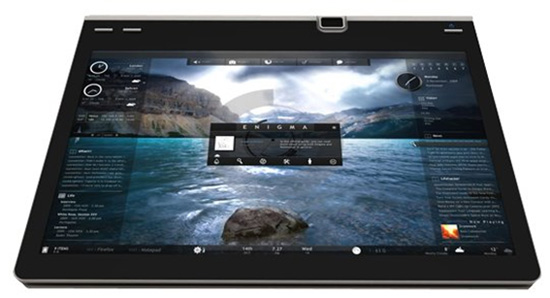
Adam Tablet is developed by Notion Ink; it is known to be equipped with advanced hardware such as Pixel Qi Display and Nvidia's Tegra 2 chip. Especially the Tegra 2 chip which gives Adam Tablet the capability to play back full 1080p high-definition video. And multi-task is a highlight.
iPad:
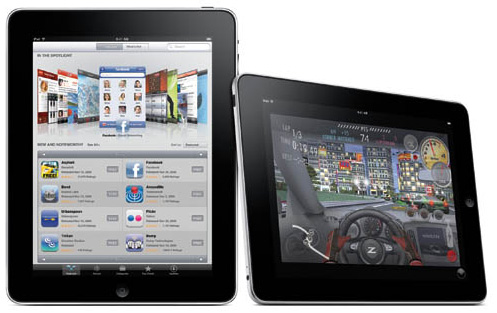
iPad, now is popular for its unique design features, beautiful and friendly interface. It indicates the fashion. iPad leads the tablet age.
Now, iPad is on the stage, and Adam Tablet is said to be fabulous; but which one is better? Just let's do some brief comparison.
Adam Tablet is developed by Notion Ink; it is known to be equipped with advanced hardware such as Pixel Qi Display and Nvidia's Tegra 2 chip. Especially the Tegra 2 chip which gives Adam Tablet the capability to play back full 1080p high-definition video. And multi-task is a highlight.
iPad:
iPad, now is popular for its unique design features, beautiful and friendly interface. It indicates the fashion. iPad leads the tablet age.
Now, iPad is on the stage, and Adam Tablet is said to be fabulous; but which one is better? Just let's do some brief comparison.
Comparison with Adam Tablet and Apple iPad
Resolution
Adam Tablet is capable of playing full 1080P high-definition video, but iPad just hold the capability to play 720P video (SD Standard). With HD Standard, we can enjoy videos conveniently.
Power & Battery
iPad supports up to 10 hours of enjoying with it, but Adam Tablet is supported to enjoy with it for 16 hours, 160 hours on backlight off mode. So, the continuity of use will influence the users a lot.
Multi-task
Adam Tablet supports to do several task processes in the same time, but iPad cannot. That's really the advantage.
Output Ports
Adam Tablet holds a HDMI and 3 USB port. This will facilitate files' transmission a lot.
Price
Adam Tablet will be priced about $ 327-800. With so-marked high quality, the price is really magnetic. Etc…
The following is the data comparisons in detail:
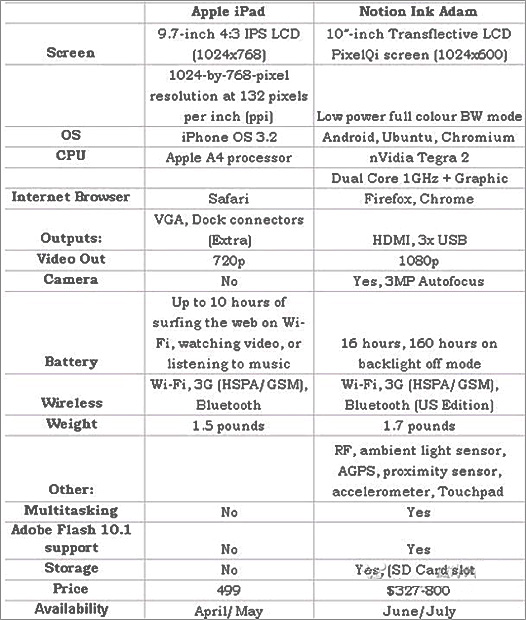
In fact, both of the two hold their own advantages, and which one is better; we cannot judge it now. So just let the market to test it in the near future.
Adam Tablet is capable of playing full 1080P high-definition video, but iPad just hold the capability to play 720P video (SD Standard). With HD Standard, we can enjoy videos conveniently.
Power & Battery
iPad supports up to 10 hours of enjoying with it, but Adam Tablet is supported to enjoy with it for 16 hours, 160 hours on backlight off mode. So, the continuity of use will influence the users a lot.
Multi-task
Adam Tablet supports to do several task processes in the same time, but iPad cannot. That's really the advantage.
Output Ports
Adam Tablet holds a HDMI and 3 USB port. This will facilitate files' transmission a lot.
Price
Adam Tablet will be priced about $ 327-800. With so-marked high quality, the price is really magnetic. Etc…
The following is the data comparisons in detail:
In fact, both of the two hold their own advantages, and which one is better; we cannot judge it now. So just let the market to test it in the near future.
Related Software
WonderFox
HD
Video Converter, it is powerful and professional software for
video converting with HD Standard.
WonderFox MP4 Video Converter, it is professional for MP4 video converting for all popular portable media player.
For more related information, please visit:
http://www.videoconverterfactory.com/hd-video-converter/
and
http://www.videoconverterfactory.com/mp4-video-converter/
WonderFox MP4 Video Converter, it is professional for MP4 video converting for all popular portable media player.
For more related information, please visit:
http://www.videoconverterfactory.com/hd-video-converter/
and
http://www.videoconverterfactory.com/mp4-video-converter/