
5:46 AM - How to Download and Transfer eBooks to Kindle
So you've got a Kindle, you want to download some books to your
Kindle device for reading and learning. Then you can transfer your
books to Kindle device via USB or Kindle personal documents
service. Not only books, magazines, but also music and movies, you
can transfer and enjoy these entertainment on your Kindle freely
and anywhere. How ever, for a new user, not every one of them knows
clearly how to transfer ebooks to Kindle. Therefore, today, I will
show you two methods of transferring the digital content to your
Kindle.
Method 1. Using USB.
Both Mac and Windows users can download and transfer Kindle
content from computer to Kindle via USB. If you have some
downloaded some ePub files, you can
convert
ePub to Kindle to read for Kindle. Go to Manage Your Kindle,
Click on the "Actions" dropdown beside the title and choose
"Download & transfer via USB".
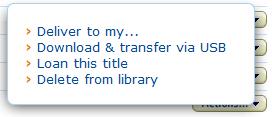
Then select the device you want to transfer to and click
"Download" button.
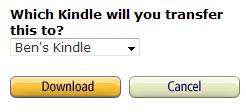
That's all.
Method 2. Kindle Personal Documents Service
With the Kindle Personal Documents Service, you can transfer
your ebooks to your email, when you connect Wi-Fi or 3G network,
the ebooks will automatically be sent to your email. So you can
read the books on Kindle without the need of USB.
Generally speaking, there are two steps to transfer content
to your Kindle.
Step one. Get your Kindle email address.
You should visit the Manage Your Kindle page on Amazon.com,
when you login your account, check out your Kindle email. On the
top-right you can see your email. There are two emails you can use:
one is username@free.kindle.com, which face to Wi-Fi users and it
is free, another is username@kindle.com, it is for 3G users and you
should pay the fee depending on flow you are using.

Step 2. Approved Personal Documents E-mail List
For preventing others freely send your unwanted magazines or
ebooks to you, Amazon provides Approved Personal Documents E-mail
List, which mean that only the email existing in the list, the
files can be send to your Kindle.
Click "Personal Document Settings", and you can see the
interface. Click "Add a new approved e-mail address", fill in the
email you want then you can receive all the files from the email.
So, download anything you like and transfer these contents to
your Kindle as fast as possible. By the way, if the book you
downloaded is under DRM protection, you can use the
free DRM
Removal to remove the DRM distraction.